Google Shopping Ads for D2C Brands: Setup Guide
Set up Google Shopping ads with the right product details, prices, and tracking. Learn what to check before raising your budget.
On this page
- Introduction
- Why Google Shopping Matters More Than Ever for D2C
- Step-by-Step Google Shopping Setup for D2C Brands
- Google Shopping Optimization Strategies That Drive Results
- Scaling Google Shopping Profitably
- Google Shopping Benchmarks by D2C Category
- Common Google Shopping Mistakes D2C Brands Make
- Frequently Asked Questions
Google Shopping ads for D2C brands show a product image, price, and store name to people searching for that kind of product. To make those clicks worthwhile, your prices must be right, your store must track orders, and the cost of each sale must leave room for profit.
In an Adthena analysis of early 2018 data, Shopping ads took about 76% of US retailers' search ad spend and generated about 85% of their search ad clicks (Adthena via MediaPost, 2018). What you earn back for each $1 spent, called return on ad spend or ROAS, depends on your products, prices, and ad costs, so set targets from your own margins.
Here is how to set up Shopping ads, check what is working, and spend more only when the sales justify it.
Why Google Shopping Matters More Than Ever for D2C
The channels do different jobs. A parent may discover an organic cotton onesie on Instagram, then search Google when ready to compare prices and buy. Your brand may need both.
A few points show why Shopping is worth testing:
- Sales: In WordStream's Shopping benchmarks, 1.91% of Shopping clicks became purchases on average (WordStream via Store Growers, 2019).
- Research behavior: Many shoppers use Google to find and compare products before buying. Feed quality affects whether your products enter those comparisons.
- Brand searches: Searches for your brand name usually return more per $1 than searches for a type of product, because many of those buyers already know you. Track the two separately.
- Reach: Shopping ads appear at the top of many product searches, often above text ads.
- Mobile: A large share of Shopping clicks come from phones. Review the product page on a phone before increasing spend.
Step-by-Step Google Shopping Setup for D2C Brands
Step 1: Create and Verify Your Google Merchant Center Account
Google Merchant Center holds the product list used for Shopping ads. Google checks it for errors. Set up the account, link your store, and fix any rejected products before spending more.
- Create the account. Use a business-controlled Google login at merchants.google.com so access stays with the company.
- Verify the store domain. Choose one of the verification methods available in your Merchant Center account, then confirm that the claimed domain matches product landing pages.
- Enter shipping, returns, and tax details. They must match what shoppers see at checkout. Incorrect shipping details are a common reason products are disapproved.
- Connect Google Ads and purchase tracking. Link the intended Ads account, confirm the primary purchase conversion, and check that order values and currency reach Google Ads once per order.
Step 2: Build a High-Quality Product Feed
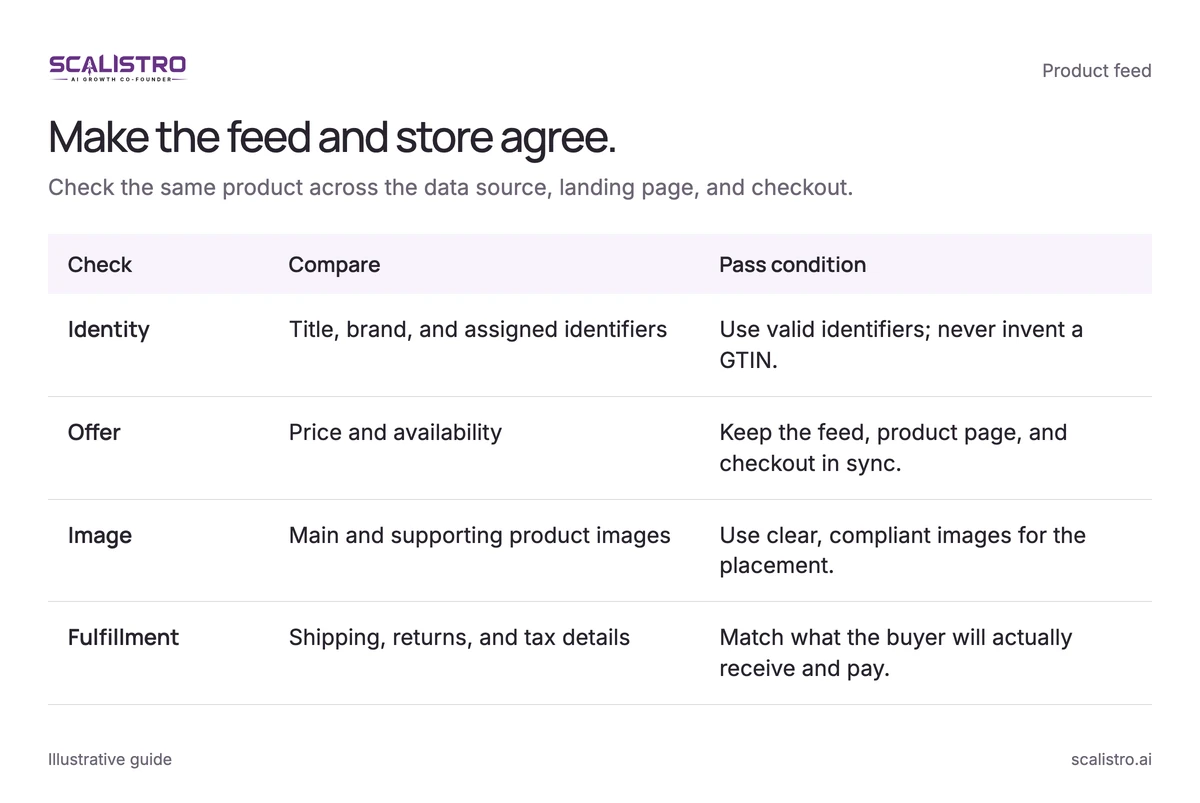
Google uses your product list, also called a feed, to decide which searches can show an ad. A wrong title, price, or image can keep an item out of Shopping or bring in the wrong clicks. Check the list whenever your catalog changes.
Swipe to explore. Tap to open full size.
Image details: Make the feed and store agree.
| Check | Compare | Pass condition |
|---|---|---|
| Identity | Title, brand, and assigned identifiers | Use valid identifiers; never invent a GTIN. |
| Offer | Price and availability | Keep the feed, product page, and checkout in sync. |
| Image | Main and supporting product images | Use clear, compliant images for the placement. |
| Fulfillment | Shipping, returns, and tax details | Match what the buyer will actually receive and pay. |
Essential product feed attributes and best practices:
| Attribute | Feed role | Practical check |
|---|---|---|
| Title | Identifies the product | Put the product type and distinguishing attributes near the front. |
| Description | Adds product context | Explain materials, use, size, and other relevant details in plain language. Do not stuff synonyms. |
| Image | Shows the offer | Use a clear, compliant main product image. Test lifestyle images where eligible and add supporting views through additional image links. |
| Price and availability | Sets shopper expectations | Sync these with the landing page and checkout. Investigate mismatches immediately. |
| GTIN and brand | Identifies known products | Supply valid identifiers when assigned. Google reports that retailers who added correct GTINs saw a 20% increase in clicks on average (Google Merchant Center Help). Do not invent an identifier. |
| Product type | Organizes your catalog | Use a useful hierarchy such as Apparel > Women > Dresses > Maxi Dresses for reporting and campaign splits. |
| Custom labels | Supports segmentation | Use up to five labels for margin, lifecycle, seasonality, and price tiers. |
You can use custom labels to group products by profit, bestseller status, season, and price. Then you can spend more on products that leave more money after the sale, without changing what shoppers see.
Step 3: Campaign Structure - Standard vs. Performance Max
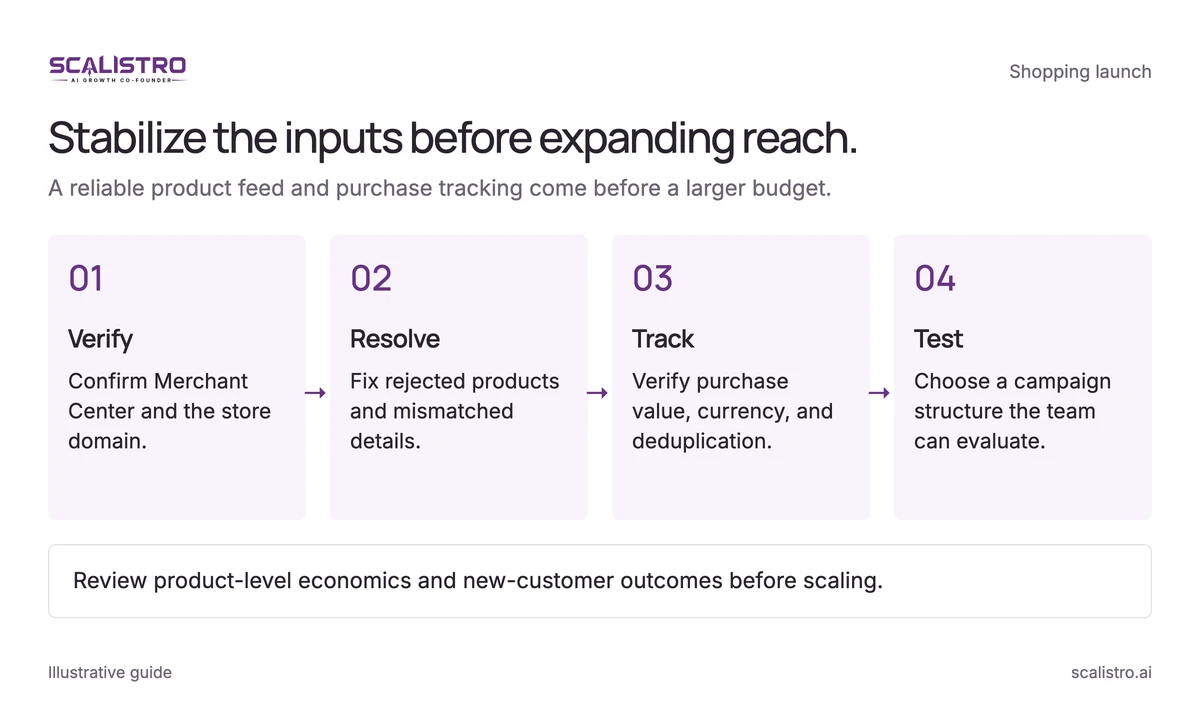
Standard Shopping gives you more direct control. Performance Max lets Google show your products across more of its channels. Start with the option your team can understand and measure well.
Swipe to explore. Tap to open full size.
Image details: Stabilize the inputs before expanding reach.
Stabilize the inputs before expanding reach. A reliable product feed and purchase tracking come before a larger budget. Verify - Confirm Merchant Center and the store domain.; Resolve - Fix rejected products and mismatched details.; Track - Verify purchase value, currency, and deduplication.; Test - Choose a campaign structure the team can evaluate. Review product-level economics and new-customer outcomes before scaling.
| Factor | Standard Shopping | Performance Max |
|---|---|---|
| Control | More direct product grouping and bidding options | Automated allocation across eligible Google inventory |
| Search insight | More direct access to Shopping search terms | More limited query and placement detail |
| Creative needs | Product feed is central | Product feed plus suitable text, image, and video assets |
| Best early use | Learn product and query economics | Expand reach after tracking and assets are stable |
Start by advertising a few bestsellers with healthy profit per order. Standard Shopping can help you see which searches bring in buyers. Once orders are tracked reliably, try Performance Max with a separate product group so you can compare results. Check total profit from each campaign, since a high ROAS on existing brand searches may bring few new buyers.
Google Shopping Optimization Strategies That Drive Results
Negative Keyword Strategy
You cannot choose the exact search words that trigger a Standard Shopping ad. Google reads your product information. You can block searches that do not fit by adding negative keywords. Review the actual searches first.
Candidates for review include:
- Research terms: People searching "review" or "comparison" may buy later. These searches usually convert at a much lower rate than direct buying searches. Block them only if they cost more than they bring back.
- Price terms: "Free" or "coupon" may be a poor fit when you have no offer. Check their order value before keeping them.
- Wrong product intent: "DIY," "used," or "wholesale" often conflicts with a new, consumer-priced product. Confirm the mismatch in your search terms report.
- Competitor names: Keep them only when a deliberate conquest test meets your acquisition target.
Check the searches weekly for the first 90 days. Irrelevant searches can take a meaningful share of early spend. Do not block broad groups without checking whether they also bring in buyers.
Bid Strategy Optimization
Decide how much you can pay for an order after product cost, shipping, and fees. Then choose a bidding goal:
- At launch: Set a spend limit. WordStream's Shopping benchmarks put the average click at $0.66 (WordStream via Store Growers, 2019), but focus on what you pay for each order.
- After steady sales: Consider a target ROAS once the campaign has enough recent orders. Fifty purchases is a useful point to review. Set a goal close to what the campaign already achieves.
- When growing: Group products by the profit they leave. A bestseller may work at 4x-6x ROAS, while a lower-margin item may need 8x-10x. Compare orders over the same time period.
Product Feed Optimization for Higher CTR
Treat the feed like a storefront. Test one type of change at a time and judge it on profitable orders, not CTR alone:
- Titles: Put the product type first or the brand first, then compare. Lesser-known brands often benefit from putting the product type first.
- Images: Try a clear product shot and an eligible lifestyle photo. Check which one produces more purchases.
- Sale prices: Show real discounts that match the store. Follow Google's price rules.
- Ratings: Add reviews if your store meets Google's current rules.
Scaling Google Shopping Profitably
Budget Scaling Framework
Before spending more, work out what remains from a sale after product cost, shipping, payment fees, returns, and discounts. If an ad costs more than that amount, the first order loses money. A ROAS number alone will not show you that.
Use this sequence:
- Set the ceiling: A $75 AOV at a 5x target ROAS implies a $15 CPA ceiling ($75 / 5). Confirm that $15 is also below your allowable acquisition cost after variable costs.
- Raise budget gradually: Try a 15-20% increase and watch results for 7-10 days. Large jumps can raise the cost of a sale while the bidding adjusts.
- Check how often you appear: At 85% of available searches, there may be little room to grow with the same products. Below 60%, there may be more room if the extra sales remain profitable.
- Add qualified products: New SKUs can open new queries, but only add items whose landing pages, stock, and margins support paid acquisition.
Advanced Segmentation for Scale
Once product economics diverge, one target for the whole feed can hide losses. At $20K or more monthly spend, the differences are often large enough to justify deliberate segmentation:
- Brand versus non-brand demand: Branded Shopping usually shows a much higher ROAS than non-brand, partly because those buyers already know you. Use available campaign controls and search-term data to understand overlap, then report each separately.
- Margin tier: A 70% gross-margin SKU may tolerate a lower ROAS target than a 40% margin SKU, but shipping and returns can change both thresholds. Custom labels make the distinction manageable.
- Product lifecycle: Give new products a measured learning budget, profitable bestsellers room to grow, and declining SKUs an efficiency target or pause decision.
Combining Google Shopping with AI-Powered Creative
Performance Max can use images, text, and video across Google. Scalistro can help make lifestyle images, ad text, and video ideas for your team to review before uploading. Compare your own results before and after making the change.
Google Shopping Benchmarks by D2C Category
We did not find a reliable, current source for Shopping costs and purchase rates by D2C category. As a broad reference, WordStream's Shopping benchmarks put the average click at $0.66 and the average purchase rate at 1.91% (WordStream via Store Growers, 2019). Category results vary widely by price, margin, and competition. Compare your own sales and ad spend to judge whether a campaign works for your store.
Common Google Shopping Mistakes D2C Brands Make
- Generic feed titles: Manufacturer titles can miss the words customers use. Poor titles can keep products out of relevant non-brand searches.
- Unreviewed queries: Irrelevant terms can waste spend. Add exclusions only after checking order value and later conversions.
- One target for every product: Different margins require different allowable CPAs. Segment before an apparently strong blended ROAS hides loss-making SKUs.
- Unmeasured budget jumps: Large increases can raise CPA while bidding adjusts. Change one major variable at a time.
- Weak product pages: A slow or unclear mobile page can waste high-intent clicks. Slow pages and missing trust signals both lower conversion.
- Missing eligible promotions: Merchant Promotions can surface genuine offers. Calculate margin after the discount.
Next, use the D2C landing page guide to check the page that receives your Shopping clicks.